
Vegetation condition analysis · Remote sensing assessment
Vegetation condition trajectory: Grove City fields, 2018–2025
Growing-season vegetation compared between a 2018–2019 baseline and 2024–2025, across eight consecutive years near Grove City, Meeker County, Minnesota.
- Location
- Grove City, Meeker County, MN
- Period
- 2018–2025, May 1 – Aug 31
- Imagery
- 132 Sentinel-2 & Landsat scenes
- Core indices
- NDVI & EVI median composites
Executive summary
Key findings from eight years of satellite observations
The period decline is smaller than the year-to-year swings
Period averages show an apparent decline. Mean NDVI fell from 0.64 in 2018–2019 to 0.59 in 2024–2025 (−0.05), and mean EVI fell from 0.52 to 0.39 (−0.13). Annual means within those periods range from 0.51 to 0.71, a wider spread than the gap between the period averages.
Alternating years match a crop rotation
The full 2018–2025 sequence cycles between strong and weak years rather than declining steadily. Peaks in 2020 (0.82), 2021 (0.77) and 2023 (0.80) alternate with lows in 2019 (0.56), 2022 (0.49) and 2024 (0.51), which matches a typical corn–soybean rotation.
2025 recovered quickly
After the 2024 low (mean 0.51), the parcel rebounded in 2025 to a mean of 0.67 (median 0.69). A return to dense canopy this fast points away from lasting degradation of the soil or the field.
90.19% of the parcel is in the healthy class
Pixel-level classification of the multi-year composite places 90.19% of the parcel in the healthy class, 9.14% in moderate condition, and under 1% in the stressed or bare classes.
Context and objectives
What the analysis set out to test, and how
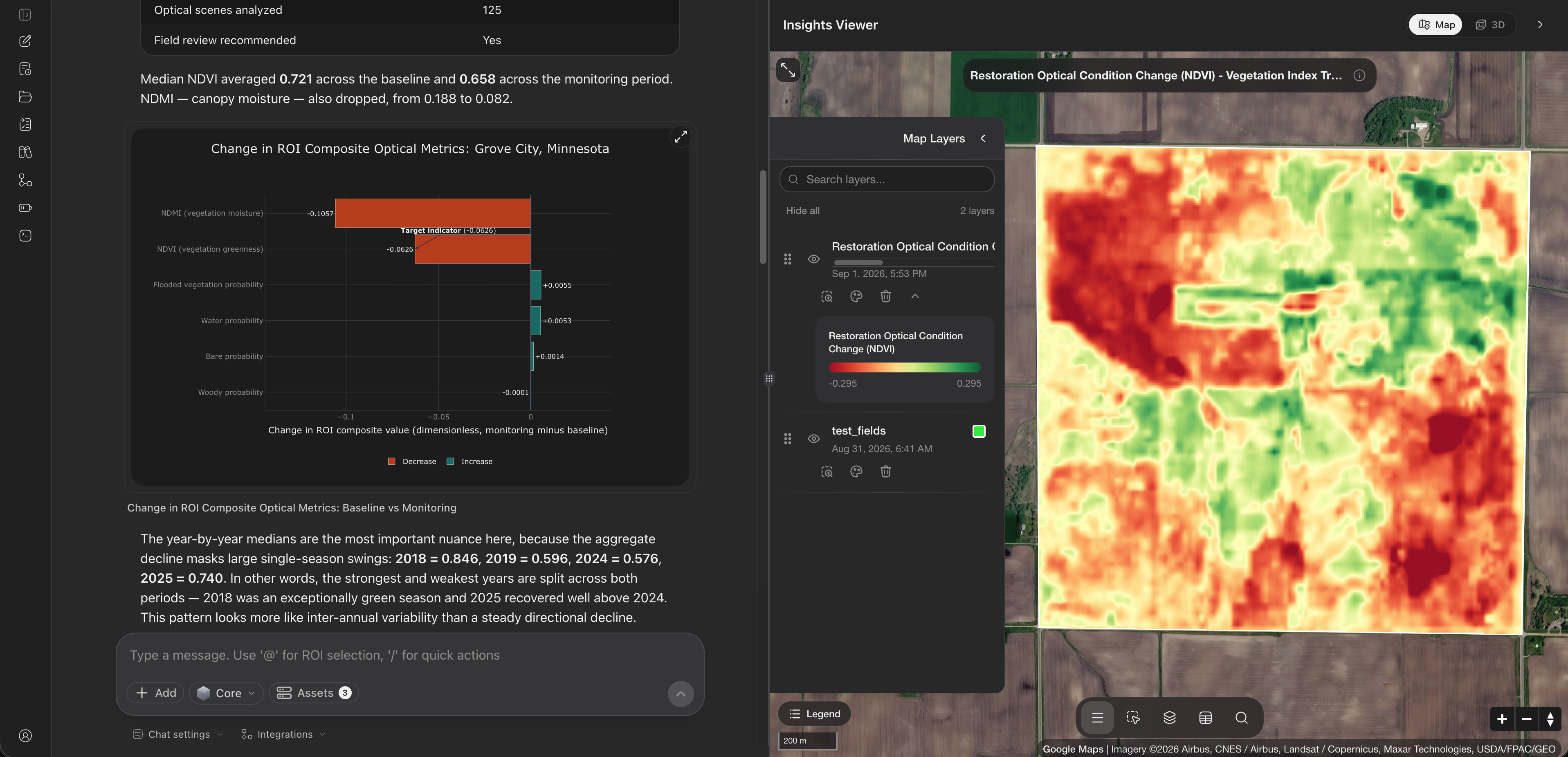
The analysis tested whether the study area (@audit_fields) shows a restoration trajectory when an early baseline (2018–2019) is compared with recent growing seasons (2024–2025). A restoration trajectory usually means a steady gain in perennial biomass, more stable cover, less exposed soil, and smaller swings from year to year as permanent ground cover establishes.
The analysis isolated the Midwest growing window (May 1 – Aug 31) across eight consecutive years. Sentinel-2 & Landsat observations were combined and cloud-masked, leaving 132 valid scenes, and two vegetation indices were derived:
- Normalized Difference Vegetation Index (NDVI) compares red light absorbed by chlorophyll with near-infrared light reflected by leaf structure.
- Enhanced vegetation index (EVI) adds the blue band to reduce haze and soil background, which keeps it sensitive in dense canopy.
Baseline and recent periods
Period averages and the years behind them
NDVI, 2018–19
0.64
Mean growing-season vigor
NDVI, 2024–25
0.59−0.05
Mild reduction
EVI, 2018–19
0.52
Dense-canopy baseline
EVI, 2024–25
0.39−0.13
Lower canopy density
- Baseline 2018–2019
- Recent 2024–2025
Baseline period
2018–2019One very productive year followed by a heavily suppressed one.
- 2018
- Mean 0.71 · median 0.74 · enhanced 0.64
- 2019
- Mean 0.56 · median 0.54 · enhanced 0.39
- Spread
- 0.15 between the two years
Recent period
2024–2025The same uneven pattern: a low year followed by a strong rebound.
- 2024
- Mean 0.51 · median 0.50 · enhanced 0.33
- 2025
- Mean 0.67 · median 0.69 · enhanced 0.44
- Spread
- 0.16 between the two years
Full trajectory, 2018–2025
Annual statistics, trend and year-to-year cycling
Looking only at the two periods hides most of the story. Across all eight years the parcel follows neither a steady decline nor a steady recovery. The fitted linear trend is slightly negative (NDVI -0.0097 per year, EVI -0.0225 per year), but swings of up to ±0.33 between consecutive seasons dwarf it.
| Year | Mean | Median | Min | Max | Mean EVI | Interpretation |
|---|---|---|---|---|---|---|
| 2018 | 0.71 | 0.74 | −0.04 | 0.90 | 0.64 | High vigor, dense canopy (likely corn) |
| 2019 | 0.56 | 0.54 | −0.06 | 0.90 | 0.39 | Suppressed canopy (late planting or rotation crop) |
| 2020 | 0.82 | 0.86 | −0.04 | 0.94 | 0.68 | Peak vigor, full canopy closure |
| 2021 | 0.77 | 0.79 | −0.05 | 0.89 | 0.59 | Sustained high canopy |
| 2022 | 0.49 | 0.51 | −0.06 | 0.89 | 0.33 | Severe low-canopy year (drought or rotation) |
| 2023 | 0.80 | 0.86 | −0.01 | 0.90 | 0.71 | Peak vigor rebound, maximum EVI |
| 2024 | 0.51 | 0.50 | −0.04 | 0.89 | 0.33 | Suppressed canopy year |
| 2025 | 0.67 | 0.69 | −0.04 | 0.87 | 0.44 | Sharp recovery |
NDVI unless the column says otherwise.
- NDVI
- EVI
- NDVI
- EVI
- Weakest years
Condition classes
How the area splits across vegetation condition classes
90.19%
Vigorous canopy across most of the parcel.
9.14%
Field edges, tracks and shallow drainage.
< 0.67%
Near-zero bare or stressed surface.
- NDVI
- EVI
Recommendations and field checks
Follow-up steps for land managers and analysts
Check against farm records
Compare the 2018–2025 curve with the operator's records of crop type, planting dates and nitrogen rates to confirm what drove the 2019, 2022 and 2024 lows.
Compare with spring rainfall
Review PRISM precipitation records for Meeker County in May and June. Heavy spring rain often delays field access, which would explain the dips without any loss of soil health.
Scout the moderate areas
Visit the 9.14% of the area in the moderate class, mostly along field margins, and check for compaction, drainage problems or perennial weeds that persist through both high and low years.
Technical appendix
Data provenance, sensors and parameters
- Data sources
- USGS Landsat Collection 2 Level-2 surface reflectance
- ESA Sentinel-2 Level-2A MultiSpectral Instrument
- Resolution and projection
- Harmonized to a 10 m grid
- WGS 84 / UTM zone 15N
- Compositing
- Pixel-wise median over 132 valid scenes
- Cloud, shadow and aerosol masks from QA bands
- Index formulas
- NDVI = (NIR − Red) / (NIR + Red)
- EVI = 2.5 × (NIR − Red) / (NIR + 6 × Red − 7.5 × Blue + 1)
Archived outputs: Cloud-Optimized GeoTIFF rasters for both index composites and pixel-level Parquet tables, kept for spatial extraction and GIS workflows.